
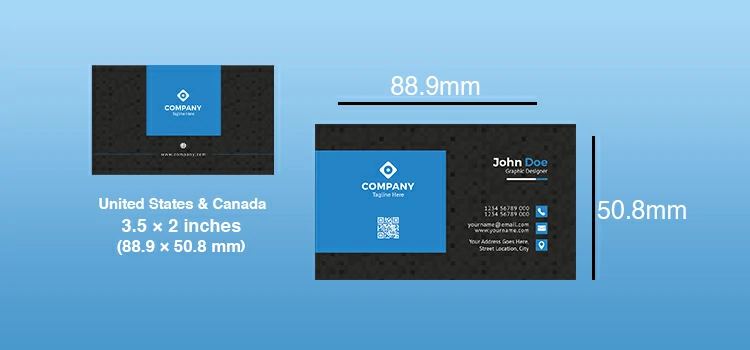
The US Business Card Size is 3.5 x 2 inches, or 88.9 x 50.8 mm. At 300 DPI for print, that equals 1050 x 600 pixels. This is the size that fits standard card holders, wallet slots, and card scanners, and deviating from it can create problems you may not notice until the cards arrive from the printer.
If you’re designing right now and just needed the number – there it is. If you’re about to send to print, keep reading. There are four more specs your file needs to be correct before that file goes anywhere near a print shop.
The Four Specs Your File Needs Before Printing
| Spec | Correct Value | Why It Matters |
| Finished Size | 3.5 x 2 inches | The final trimmed card dimensions |
| Bleed Area | +0.125 inches on all sides (3.75 x 2.25″) | Prevents white edges if the cut is slightly off |
| Safe Zone | 0.125 inches inside the finished edge | Keep all text and logos inside this – nothing important near the edge |
| Resolution | 300 DPI minimum | Anything lower prints blurry – 72 DPI (screen resolution) will look terrible |
| Colour Mode | CMYK | RGB is for screens; CMYK is for print. Sending RGB causes unexpected colour shifts |
Most design tools (Adobe Illustrator, InDesign, Canva Pro) let you set these up at the start. If you’re using a free design tool, check whether it supports CMYK export before designing anything – some don’t, and switching later is painful.
US vs. International Business Card Sizes
If you’re printing cards for international use or sourcing them from overseas printers, the size differences matter. A card designed to US specs may have white borders when printed on European card stock, or won’t fit Japanese card holders.
| Country / Region | Size (Inches) | Size (mm) | Notes |
| United States | 3.5 x 2″ | 88.9 x 50.8 mm | Standard – widest use globally |
| United Kingdom | 3.46 x 1.97″ | 85 x 55 mm | ISO standard – slightly taller |
| Europe (ISO 7810) | 3.37 x 2.13″ | 85.6 x 54 mm | Credit card size – same as EU ID card |
| Japan | 3.58 x 2.17″ | 91 x 55 mm | Slightly larger – card exchange (meishi) is formal |
| Australia | 3.54 x 2.17″ | 90 x 55 mm | Closer to EU standard than US |
| China | 3.54 x 2.17″ | 90 x 54 mm | Similar to Australia/EU |
If you attend international trade events or regularly give cards to overseas contacts, consider whether to use the ISO standard (85.6 x 54mm) – it fits most card holders worldwide and the visual difference from the US standard is negligible.
Standard vs. Non-Standard Sizes: When to Break the Rules
| Card Type | Size | Best For | Watch Out For |
| Standard US | 3.5 x 2″ | Everyone – universal compatibility | – |
| Mini Card | 3.5 x 1″ | Photographers, creatives, memorable branding | Won’t fit most card holders or wallets |
| Square Card | 2.5 x 2.5″ | Designers, modern brands, standing out | Higher print cost, awkward to store |
| Folded Card | 3.5 x 4″ (folds to 3.5 x 2″) | Consultants, service providers with more info to share | Thicker – may not fit all card sleeves |
| Rounded Corner | 3.5 x 2″ with 1/8″ radius | Premium feel, tech brands | Slightly higher cost, but increasingly popular |
Non-standard sizes cost more to print and can frustrate recipients who can’t store them easily. Unless the unusual format is a deliberate brand choice that reflects your identity, stick with the standard 3.5 x 2 inch.
Paper Stock and Finish: What Changes the Feel
The size is just the canvas. The paper and finish determine how the card actually feels in someone’s hand – and tactile impression matters more than most designers admit.
| Finish | Feel | Best For | Cost Level |
| Matte | Smooth, flat, no glare | Professionals, minimalist brands, writable surface | Low |
| Gloss | Shiny, vivid colour | Photographers, vibrant image-heavy cards | Low |
| Soft-Touch / Velvet | Silky, premium texture | Luxury brands, high-end consultants | Medium-High |
| Spot UV | Selective gloss over matte base | Logos or elements you want to stand out | High |
| Letterpress | Debossed impression in thick card | Premium, traditional, law firms, finance | High |
Common Mistakes That Ruin Print Jobs
- No bleed set up – when the printer trims, a thin white border appears around the edge. Always extend background colours and images to the bleed line.
- Text too close to the edge – even with a safe zone, slight trim variation means text can appear cut. Keep important content at least 0.125″ inside the finished edge.
- Designing in RGB – the shift from RGB to CMYK can turn a vibrant blue into a dull purple. Design in CMYK from the start or proof before ordering in bulk.
- Low resolution logo – scaling up a 72 DPI logo to fill a card looks fine on screen and terrible in print. Always work with vector files (.ai, .eps, .svg) for logos.
- Ordering without a physical proof – digital proofs don’t capture how colours, finishes, and paper weight actually feel. Order a sample before committing to 500+ units.
What 500 Wrong Cards Taught Me
Early in my freelance career I designed my first batch of business cards in Photoshop. Looked perfect on screen. I uploaded the file, paid for 500 cards, and waited.
They arrived with a thin white border along two edges. I’d set up the canvas at exactly 3.5 x 2 inches – but hadn’t added any bleed. The printer’s trimming machine cut in slightly, and the background colour didn’t extend far enough to cover it.
Five hundred cards, unusable. I handed out about 30 of them anyway – flipping them face-down when possible – and chalked the rest up to an expensive lesson. The reprint cost more than just setting up the bleed correctly the first time would have.
Pre-Print Checklist
| Check | Done? |
| Canvas set to 3.75 x 2.25″ (includes bleed) | ☐ |
| All important content within safe zone (0.125″ inside finished edge) | ☐ |
| Resolution set to 300 DPI | ☐ |
| Colour mode set to CMYK | ☐ |
| Fonts embedded or outlined (not live text) | ☐ |
| Logo saved as vector or 300 DPI+ raster | ☐ |
| Proofread both sides at 100% zoom | ☐ |
| Ordered physical proof before bulk order | ☐ |
Free Templates Worth Using
- Canva – search ‘US Business Card’ for pre-sized templates with bleed guides already set up
- Adobe Express – free templates with correct dimensions, exportable as PDF for print
- Moo.com – design tool built into their ordering process; handles bleed automatically
- Vistaprint template downloads – free Illustrator and Photoshop templates with all specs pre-configured
Whatever tool you use, confirm the export settings before hitting send. A 3.5 x 2 inch card designed correctly is one of the simplest things to print well – and one of the easiest things to get slightly wrong.